
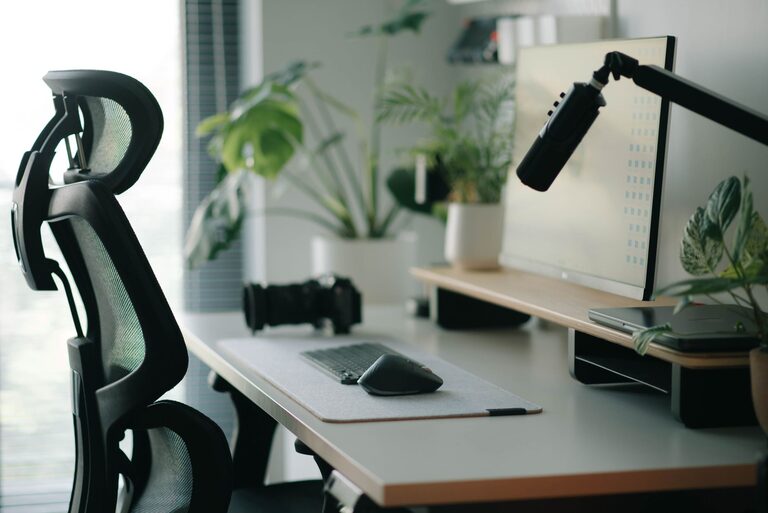
Why Your Home Workspace Matters
A comfortable home workspace can make everyday tasks feel easier and more manageable. Whether you work from home, study, manage household projects, or enjoy creative hobbies, your surroundings can affect your focus, energy, and overall experience.
You do not need a large room or an expensive renovation to create a useful workspace. Small improvements, such as adjusting your chair, reducing clutter, or adding better lighting, can make a noticeable difference. The goal is to create a space that supports your routine and feels pleasant to use.
Choose the Right Location
Start by choosing a location that matches the way you use your workspace. A separate room may offer privacy, but a quiet corner of a bedroom, living room, or hallway can work just as well.
Consider the following when selecting a spot:
- Noise levels: Choose an area away from loud appliances, busy walkways, or frequent distractions when possible.
- Natural light: A location near a window can make the space feel brighter and more inviting.
- Available outlets: Make sure your equipment can be powered without stretching cords across the room.
- Room to move: Leave enough space to sit down, stand up, and adjust your chair comfortably.
- Background appearance: If you regularly join video calls, consider how the area looks behind you.
If your home has several possible locations, test each one for a day or two. You may find that a spot that looks ideal is too noisy, dark, or cramped during your normal schedule.
Invest in a Supportive Chair
Your chair is one of the most important parts of a home workspace. You do not need to choose the most expensive model, but it should provide steady support and allow you to sit comfortably for your usual tasks.
Look for a chair with adjustable features, such as seat height, back support, and armrests. Your feet should rest flat on the floor, and your knees should be positioned comfortably rather than pressed against the desk. If your feet do not reach the floor, a small footrest or sturdy box can help.
Try to avoid working from a couch or bed for long periods. These areas may feel comfortable at first, but they often make it harder to maintain a supported sitting position. They can also encourage awkward angles for your neck, wrists, and back.
Set Up Your Desk Carefully
A good desk should provide enough room for your computer, keyboard, notebook, and other frequently used items. It should not be so crowded that you have to move objects every time you begin a task.
Keep Your Screen at a Comfortable Height
Place your monitor or laptop so that you can look at the screen without constantly bending your neck. A monitor stand, adjustable arm, or stack of stable books can raise a screen to a more suitable height. If you use a laptop for extended periods, consider adding a separate keyboard and mouse so the screen and input devices can be positioned independently.
Position Your Keyboard and Mouse
Keep your keyboard and mouse close enough that your shoulders can stay relaxed. Your wrists should not be forced into an extreme angle, and your elbows should remain near your sides. Small adjustments to the height and distance of these items can make the desk feel much more natural.
Improve the Lighting
Lighting has a major effect on how comfortable a workspace feels. Too little light can make a room feel dull, while glare can make it difficult to read a screen or printed page.
Use natural light when available, but avoid placing your monitor directly in front of or behind a bright window. A position that places the window beside you may reduce reflections. Adjust curtains or blinds throughout the day as the sunlight changes.
Add a desk lamp for focused tasks, especially if you work in the evening. Choose a lamp with an adjustable shade so you can direct light onto paperwork without shining it directly into your eyes or screen. Soft, even lighting throughout the room can also reduce the contrast between a bright screen and a dark background.
Control Clutter and Organize Essentials
A tidy workspace is easier to use and maintain. Start by removing items that do not belong in the area. Then group the supplies you use most often and place them within easy reach.
- Use a small tray for pens, notebooks, and daily tools.
- Store paperwork in labeled folders or vertical file holders.
- Keep chargers and cables together with simple clips or ties.
- Place rarely used items in a drawer, cabinet, or storage box.
- Leave a clear section of the desk for writing or planning.
Try to finish each work session with a quick reset. Returning items to their usual locations takes only a few minutes and makes it easier to begin the next day.
Add Comfort Without Creating Distractions
Personal touches can make a home workspace feel more welcoming. Consider adding a plant, framed print, small lamp, or favorite color through accessories. Choose items that improve the atmosphere without taking up too much valuable desk space.
Temperature also matters. Keep a sweater or light blanket nearby if the room tends to feel cool. If air movement is an issue, adjust a fan or vent so it does not blow directly toward your face or hands. A water bottle placed within reach can help you stay refreshed without interrupting your routine.
Be selective with decorative items and scented products. Strong scents, busy patterns, or too many objects may become distracting over time. Aim for a balance between personality and simplicity.
Create a Workspace Routine
A consistent routine can help your workspace feel more organized. Before starting, clear the main working area and open only the tools you need. During longer sessions, take short breaks to change position, look away from the screen, or walk around the room.
At the end of the day, close unnecessary tabs, put away loose papers, and prepare the space for the next use. If your workspace is in a shared room, a basket, folding screen, or cabinet can help separate work items from the rest of the room when your tasks are finished.
Make Small Improvements Over Time
You do not have to perfect your home workspace in one weekend. Use it for a week and notice what feels inconvenient. Perhaps the lamp needs to move, the chair needs a cushion, or frequently used supplies should be closer.
Make one change at a time and observe the result. This approach helps you spend thoughtfully and build a workspace that fits your real habits rather than copying a setup that may not suit your home.
A comfortable workspace comes from practical choices: supportive seating, suitable lighting, an organized surface, and enough flexibility to adjust throughout the day. With a few simple changes, even a small area can become a comfortable and dependable part of your home.